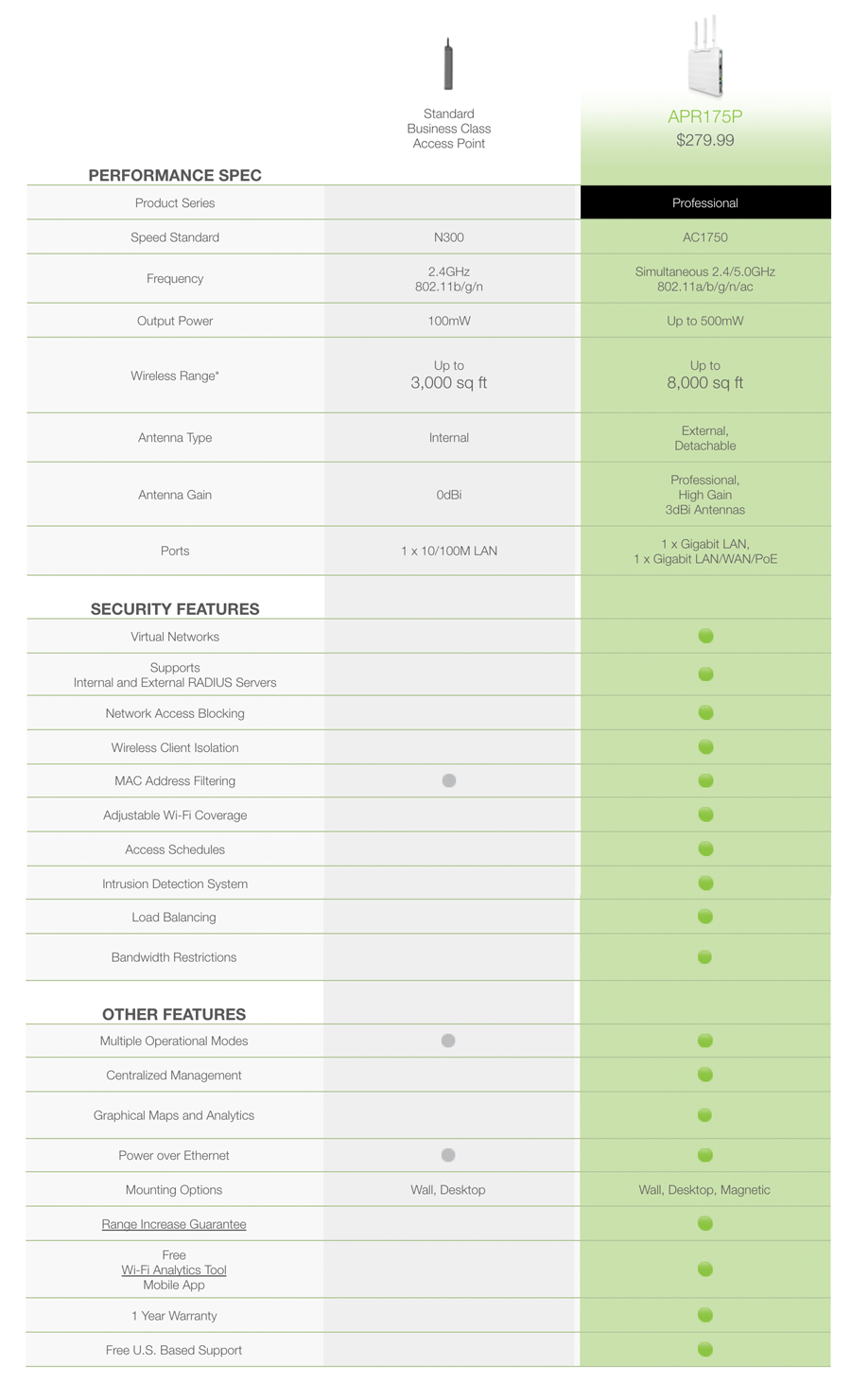
Amped Wireless ProSeries High Power AC1750 Wi-Fi Access Point / Router ARP175P
SKU
APR175P
Robust range, centralized management & business-class security features for professionals
Browse the selections below to view support materials and troubleshooting tips. FAQs provide you with answers to frequently asked questions. The Download section provides you with firmware upgrades or device drivers and other related software. To view the User's Guide for your product check out the Documentation section. If you are having problems finding what you need, contact us.
Make sure your computer is connected to the Access Point wirelessly and NOT using a network cable. Ensure the power is plugged in and on. Try to access the setup menu again.
Disconnect wirelessly from the Access Point and use a network cable to connect to the Access Point. Connect to the LAN2 wired port.
Enter the following web address into your web browser instead of ‘setup.ampedwireless.com’: http://192.168.80.1
Power off (unplug the power adapter) the Access Point and power it back on. Try again.
Power off your PC and power it back on. Try again. (Release and renew your IP address)
Try to open your web browser to the default IP address by putting this number into your web browser instead: 192.168.80.1
Reset your Access Point to default settings by holding the Reset Button (located on the back panel) for ten (10) seconds and try again.
If you are using a Static IP, you will need to enter the assigned IP Address into the web browser to access the web menu. When using a Static IP, the setup.ampedwireless.com shortcut will no longer work.
Your router or original network may not have Internet access. First check to see if you are able to access the Internet by connecting directly with your router. If you cannot, there is a problem with your router that needs to be fixed first. If you are able to access the internet, continue with the following troubleshooting options below.
Your router may be using Static IP assignments. If so, you will need to configure a Static IP for the Access Point. Connect your PC to the Access Point using an Ethernet cable. Disconnect your PC from any wireless networks that it may be connected to. Access the web menu at setup.ampedwireless.com using a web browser. Access the IP settings menu from the left hand navigation bar. Select ‘Disable’ under the DHCP dropdown menu and enter an IP address that matches your router’s IP settings.
Detach the Access Point from your router and reset it back to default settings by holding down the reset button (red circle) on the back panel of the Access Point for 5-10 seconds. After it has reset, reattach it to your router’s network port. Allow up to 2 minutes for the Access Point to reconfigure itself to your network and attempt to access the Internet through the Access Point’s wired or wireless network.
The settings on your router’s network may have changed or you may have lost internet connection on your home router. Any changes to the DHCP settings of your home router may affect the Internet connection of the Access Point. Check the settings on your router and try again.
Reboot the Access Point by unplugging the power adapter and plugging it back in. Allow up to 2 minutes for the Access Point to reconfigure itself to your network. Check to see if your connection has been reestablished by viewing a website.
Double check that you are connected to the Access Point and not to your home router. Use an Ethernet cable and attach it between your computer and the Access Point. Disconnect your computer from all wireless networks and try to access the web menu again.
If you are advanced in networking troubleshooting, log onto your home router’s web interface. Look for the DHCP client list and try to find the IP address of your Access Point assigned by your home router. Once you have it, connect to the Access Point using an Ethernet cable. Open your web browser and enter the IP address into the address bar.
Reset the Access Point back to default settings and try the Basic Setup again. To reset the Access Point back to default settings, hold the Reset Button (on the back panel) down for five (5) to ten (10) seconds. After the Access Point has fully reset, use an Ethernet cable and connect to the Access Point. Log in to the web menu at http://setup.ampedwireless.com and reconfigure the settings for your Access Point.
You may be too far away from the wireless network. Wireless data transfer speeds degrade as distances increase between your computer and the Access Point.
You may be downloading from the Internet and not within your local network. Files transferred through the Internet are limited by your ISP speed and the data download speeds from the website that you are downloading from.
Your computer may be using an older Wi-Fi adapter with lower speed limits (802.11b/g/n). For maximum speeds, use 802.11ac Wi-Fi adapters.
You may have interference on the wireless channel that the Access Point is currently using. Try changing the channel of your wireless network.
Step back at least 10 feet from the Access Point and check your signal again. The Access Point emits high power, long range Wi-Fi signals that may confuse your wireless adapter signal reading at close range. The speed and signal are at 100%, however your readout may not be displaying the data correctly.
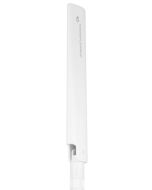
Check that your antennas are securely fastened to the antenna connectors.
The wireless channel that your network is running on may be congested. Change the wireless channel on your Access Point.
Check to see that your wireless output settings are at 100%. Go to the web menu, Wireless Settings and check the Advanced Settings. Make sure the output power is at 100%.
Check that your antennas are securely fastened to the antenna connectors.
Your Access Point may be installed in a poor location. Avoid setting up your Access Point in areas with high interference, such as near fridges, microwaves, metallic objects and low surfaces. Install the Access Point in a higher location if possible.
Adjust the Antennas of the Access Point in different angles.
Your wireless network adapter may be outdated and have older wireless technology not capable of achieving the wireless network speeds of the Access Point. To achieve maximum wireless speeds, it is required that you have a 802.11n (2.4GHz) or 802.11ac (5GHz) adapter.
Check that you are using the latest Wi-Fi security type: WPA or WPA2 WEP security may slow down your wireless speeds.
Check that the Access Point’s wireless data rate is set to AUTO or 11N (2.4GHz) and 11AC (5GHz) data rate speeds.
Wireless speeds degrade as you get further away from the Access Point.
Check that the wireless channel set on the Access Point is not crowded. Try changing the wireless channel to another channel and test the speed again.
The Access Point supports WPS connections, however, some companies may use proprietary code for their own push button configurations. Try connecting using the Windows wireless utility or Mac wireless utility instead.
Client Isolation and SSID isolation restricts network access for wireless devices only. If you have devices connected to the wired ports of the Access Point or Router they will not be isolated.
To isolate the entire network from connecting wireless devices, enable the Internet Only feature when configuring security settings for your Wi-Fi network.
Certain features such as Port Forwarding and DMZ are only available when the Access Point is in Router mode. Ensure that you are using the proper operational mode for the feature you wish to enable.
The “Local AP Wi-Fi” settings for the AP Controller may be disabled.
While in AP Controller mode, select Local AP Wi-Fi from the top navigation menu, then select 2.4GHz or 5GHz Wi-Fi Settings > Basic Settings from the left side menu. Enable the Wi-Fi Radio.
Check that all Managed Access Points are powered on.
Check that all Managed Access Points are set to “Managed Access Point” operational modes. If they are not please do so from the Web Menu for each Access Point.
Check that all Managed Access Points are set to “Managed Access Point” operational modes. If they are not please do so from the Web Menu for each Access Point.
Check that all Managed Access Points are connected to the same physical network as the Access Point Controller. If your Access Points are on different networks or if there is a firewall or network protocols blocking communication between the Access Points, Basic Setup will not be able to discover the Access Points to configure them. Please make sure all Access Points are on the same network.
Check that all Managed Access Points are on the same IP subnet as the Access Point Controller. Normally IP addresses are provided by the DHCP Server on your network’s router, however if your network is running a static IP configuration, you will need to manually enter the IP for the AP Controller and all Managed APs before configuring.
Access Point Controller Management Topology: The AP Controller can configure settings of Managed Access Points (up to 7). A Managed Access Point can belong to a single Access Point Group. An Access Point Group can have a 2.4GHz WLAN Group and a 5GHz WLAN Group. Each WLAN Group can have up to 16 unique WLAN networks or SSIDs.
The Access Point Group does not have any WLAN Groups associated with it. Add WLAN Groups to the Access Point Group by editing the Access Point Group: Managed AP Settings > Access Points
Access Point Controller Management Topology: The AP Controller can configure settings of Managed Access Points (up to 7). A Managed Access Point can belong to a single Access Point Group. An Access Point Group can have a 2.4GHz WLAN Group and a 5GHz WLAN Group. Each WLAN Group can have up to 16 unique WLAN networks or SSIDs.
Check that all Access Points are in Managed Access Point mode and are on the same physical network and same IP subnet as the Access Point Controller.
Click on Managed AP Settings on the top menu and check that all of your Managed Access Points appear in the Access Points list.
Go to Wi-Fi Settings on the left hand menu and add Local Wi-Fi Networks.
Once you have Local Wi-Fi Networks created, add them to a Local Wi-Fi Network Group.
Click on Access Points from the Left side menu, and add an Access Point Group. After setting up the details of your Access Point Group, near the bottom you can configure the Profile Group Settings. Select the Wi-Fi network (WLAN) Group that you created with the Local Wi-Fi Networks.
Last apply the Managed Access Points to this group that you wish to use with the WLAN Group settings.
Each Wi-Fi Network (WLAN/SSID) must also have RADIUS servers or MAC Filters selected as an Additional Authentication method in order for the feature to work. This can be configured here: Managed AP Settings > Wi-Fi Settings > Local Wi-Fi Networks (Add/Edit).
You may have not selected your location in the Managed AP Map menu. Select the location by clicking on the dropdown menu in the upper right corner of the Map menu. b. Adjust the transparency of the map or the zoom.
Set the RSSI threshold to a lower number (i.e. 0 to -50). This will allow the Access Point to handover the device when the signal strength between the device and the Access Point is still moderately strong.
Change the device to a device that supports the Smart Handover feature. Some older Wi-Fi adapters do not support the Smart Handover feature.
Important: Before upgrading firmware, always save your current settings from the Save/Reload Settings page.
To access from the web menu: More Settings > Management > Save/Reload Settings > Save Settings to File After the firmware updates, load your saved settings to keep your existing configurations.
Specifications are subject to change without notice. * Range specifications are based on performance test results. Actual performance may vary due to differences in operating environments, building materials and wireless obstructions. Wireless coverage claims are used only as a reference and are not guaranteed as each wireless network is uniquely different. Maximum wireless signal rate derived from IEEE 802.11 standard specifications. Actual data throughput may vary as a result of network conditions and environmental factors. AC1750 wireless signal speeds achieved when connecting to other 802.11ac devices.